Custom Search

3 in 1 Phone Charger, Micro SD Card reader, Hand Strap for Nokia Mobiles

Ever think of putting more functions to your hand (phone) strap? Here is one way! This series of hand strap gives you not only hand strap, it also it a charging cable (thru USB) to your cellphone, A SD Card Reader and moreover, it can be attach to your keychain too!
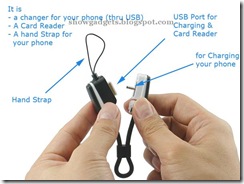
3 in 1 Phone Charger, Micro SD Card reader, Hand Strap for Nokia Mobiles

Features:

  • handstrap
  • emergency charging cable
  • A SD Card Reader
  • Smart looking
  • Sleek surface and Ergonomic, good handfeel.
  • Plug and Play, no driver needed!
  • Not just a handstrap, it is also attachable to your keychain.
  • Ultra Strong Connection (to your keychain)

Supported Nokia mobiles for charging:

1600, 3110 Classic, 3250, 5070, 5200, 5300 XpressMusic, 5500 Sport, 5700 XpressMusic, 6070, 6080, 6085, 6086, 6101, 6103, 6111, 6125, 6131, 6136, 6151, 6233, 6270, 6280, 6288, 6290, 6300, 7360, 7370, E61, E61i, N70, N70 Music Edition, N71, N72, N73, N73 Music Edition, N76, N80, N91, N91 8GB, N93, N93i, N95, N800 Internet Tablet and other Nokia Cell phones using the same connector as above listed mobiles

More Images: Click the picture to enlarge

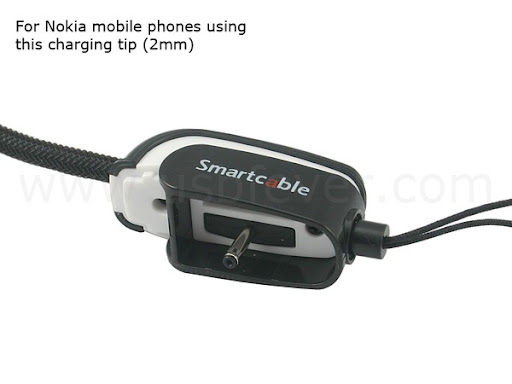
SD Card Reader Nokia Mobile Charging Handstrap

3 in 1 Phone Charger, Micro SD Card reader, Hand Strap is available for US$13.99 from USBFever.

Google Tips to get Best Search Results-2

5. Word variations (stemming)

Google now uses stemming technology. Thus, when appropriate, it will search not only for your search terms, but also for words that are similar to some or all of those terms. If you search for pet lemur dietary needs, Google will also search for pet lemur diet needs, and other related variations of your terms. Any variants of your terms that were searched for will be highlighted in the snippet of text accompanying each result.

6. Phrase searches:

Sometimes you'll only want results that include an exact phrase. In this case, simply put quotation marks around your search terms.

Phrase searches are particularly effective if you're searching for proper names ("George Washington"), specific information("George Washington was born in"), or other famous phrases ("This was their finest hour").

7.Negative terms:
Suppose you are searching for information about Stanford city. but when you search Stanford through google most result will include about Stanford university not about the city.you can focus your search by putting a minus sign ("-") in front of words related to the meaning you want to avoid. For example, here's how you'd find pages about Stanford city, but not Stanford university: stanford -university

Note: when you include a negative term in your search, be sure to include a space before the minus sign.

8.And finally... "I'm Feeling Lucky"

After you've entered your search terms, you might want to try the "I'm Feeling Lucky" button, which takes you straight to the most relevant website that Google found for your query. You won't see the search results page at all, but if you did, the "I'm Feeling Lucky" site would be listed on top.

For example, if you're looking for the Stanford University homepage, just enter Stanford and click "I'm Feeling Lucky" instead of the Google Search button. Google will take you directly to "www.stanford.edu."

Remove/Stop Spywares with Spyware Blaster

Prevent the installation of spyware and other potentially unwanted software!

Spyware, adware, browser hijackers, and dialers are some of the fastest-growing threats on the Internet today. By simply browsing to a web page, you could find your computer to be the brand-new host of one of these unwanted fiends!

The most important step you can take is to secure your system. And SpywareBlaster is the most powerful protection program available.

Features:

Prevent the installation of ActiveX-based spyware, adware, browser hijackers, dialers, and other potentially unwanted software. Block spyware/tracking cookies in Internet Explorer and Mozilla Firefox. Restrict the actions of potentially unwanted sites in Internet Explorer.

SpywareBlaster can help keep your system spyware-free and secure, without interfering with the "good side" of the web.

And unlike other programs, SpywareBlaster does not have to remain running in the background.

SpywareBlaster is freeware for personal and educational use.

SpywareBlaster is freeware. Please consider donating to further their cause! Click here for more information.

You may download Spyware Blaster from JavaCoolSoftware Website.