Custom Search
Showing posts with label start menu. Show all posts

Clear/Disable Recent Documents History from Start Menu

Windows keep records of your recently opened documents. You could access your most recently opened documents by clicking the Start>Recent Documents.

Its a good feature if you have to open/edit some files often.

But it could be a privacy threat for you. There are always some files(Pictures, videos,documents etc) that you will never wanted to know some one about it. If you open these files these will be automatically added to the “Recent documents”. and someone could easily find them.

You could disable this feature by doing this:

  • Right-click the Start button, and then click Properties.

Start Menu Properties

  • On the Start Menu tab, click Start menu, and then click Customize.

Start Menu Customize

  • On the Advanced tab, uncheck the “List my most recently opened documents” check box.

Disable Recent Documents

  • The next time you click Start, the My Recent Documents folder will be gone from Start menu.

Note:

To clear Recent documents click On the Advanced tab, click Clear List to empty the My Recent Documents folder. This does not delete the documents from the computer.

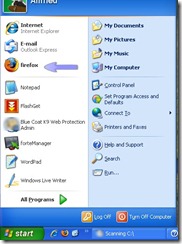
Adding a Program at the top of the Start menu

If you use some programs frequently then you should add them at the top of Windows Start Menu for easier and quick access.

To display a program at the top of the Start menu in Windows XP

  • Right-click the program you want to display at the top of the Start menu. You can right-click a program on the Start menu, in Windows Explorer, in My Computer, or on the desktop.

Pin to Start Menu

  • Click Pin to Start menu.
  • The program is displayed in the pinned items list in the area above the separator line on the Start menu.

Top of the start menu

Notes:

  • You can remove the program from the pinned items list by right-clicking the program and then clicking Unpin from Start menu.
  • You can change the order of the programs on the pinned items list by dragging a program to a new position.
  • You cannot pin or unpin items using the Classic Start menu.